DeepCharts Risk Manager setup, section by section
Account or connection, symbol list, daily and trailing limits, the Action field, trading hours and the freeze switch: a firm's rules turned into locks, in order.
The Risk Manager is the part of DeepChartsOFF that turns a prop firm's rulebook into locks on your own screen. What it can do, and why it matters on an evaluation, is covered in our overview of the platform for prop firm evaluations. This guide is the next step: how to set it up, section by section, in the order that avoids the usual surprises.
The work takes ten minutes once your limits are written down. Do that first, with the firm's rules in front of you: the Risk Manager enforces exactly what you declare, nothing more.
Start in the Portfolio window
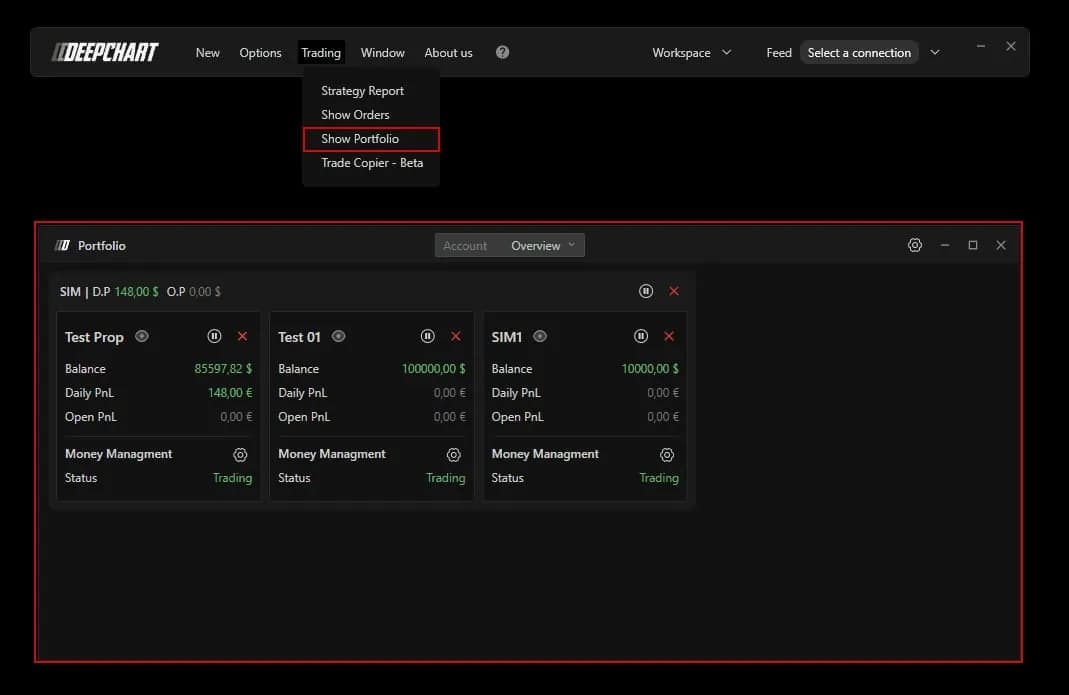
The Risk Manager lives in the Portfolio window, not in the chart settings: open Trading, then Show Portfolio. The Overview tab shows one card per connection, SIM, Rithmic or dxFeed depending on your setup, and inside it one card per account with its Balance, Daily PnL and Open PnL. The connection header adds D.P, the day's result across all its accounts, and O.P, the open result.
Two buttons work before any rule exists. Pause locks the accounts for 1, 10, 30 or 60 minutes, or the whole session. The cross flattens every position at once. Each account card has the same pair for itself alone, and the header pair acts on the whole connection. After two losing trades in a row, the pause button is the fastest risk tool on the platform.
Choose the level: account or connection
Rules can apply to one account or to a whole connection, and that choice comes before any number. Click the gear on an account's Money Managment line and pick Settings (account) or Settings (connection).
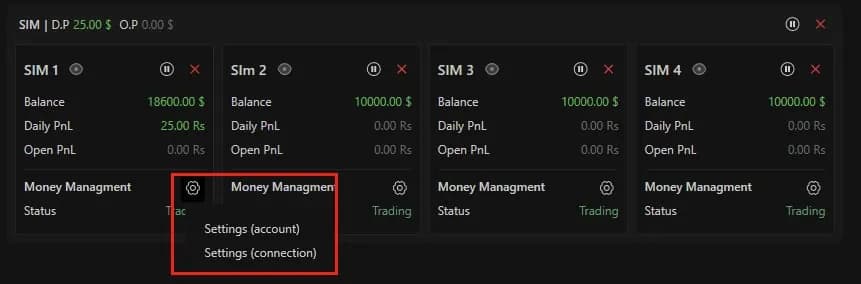
Per account is the right level for prop firm work. A 50K and a 150K evaluation on the same Rithmic connection carry different limits, and each needs its own. Per connection makes sense when you want one overall cap on top, for example a single daily loss for everything you trade that day.
Switch it on and fence the symbols
Every rule is inert until Enable is on: the GENERAL section of the Money Managment Settings (client side) window arrives switched off. Turn it on first, so you do not finish the setup with rules that apply to nothing.
The three symbol switches below it decide what you may trade. With Symbols - Exclude not listed on, only the instruments you add by hand to the Symbols list can be traded. List MNQ alone, and an order sent to NQ by a slip of the mouse is refused. On a micro evaluation, that one switch removes the costliest mistake there is.
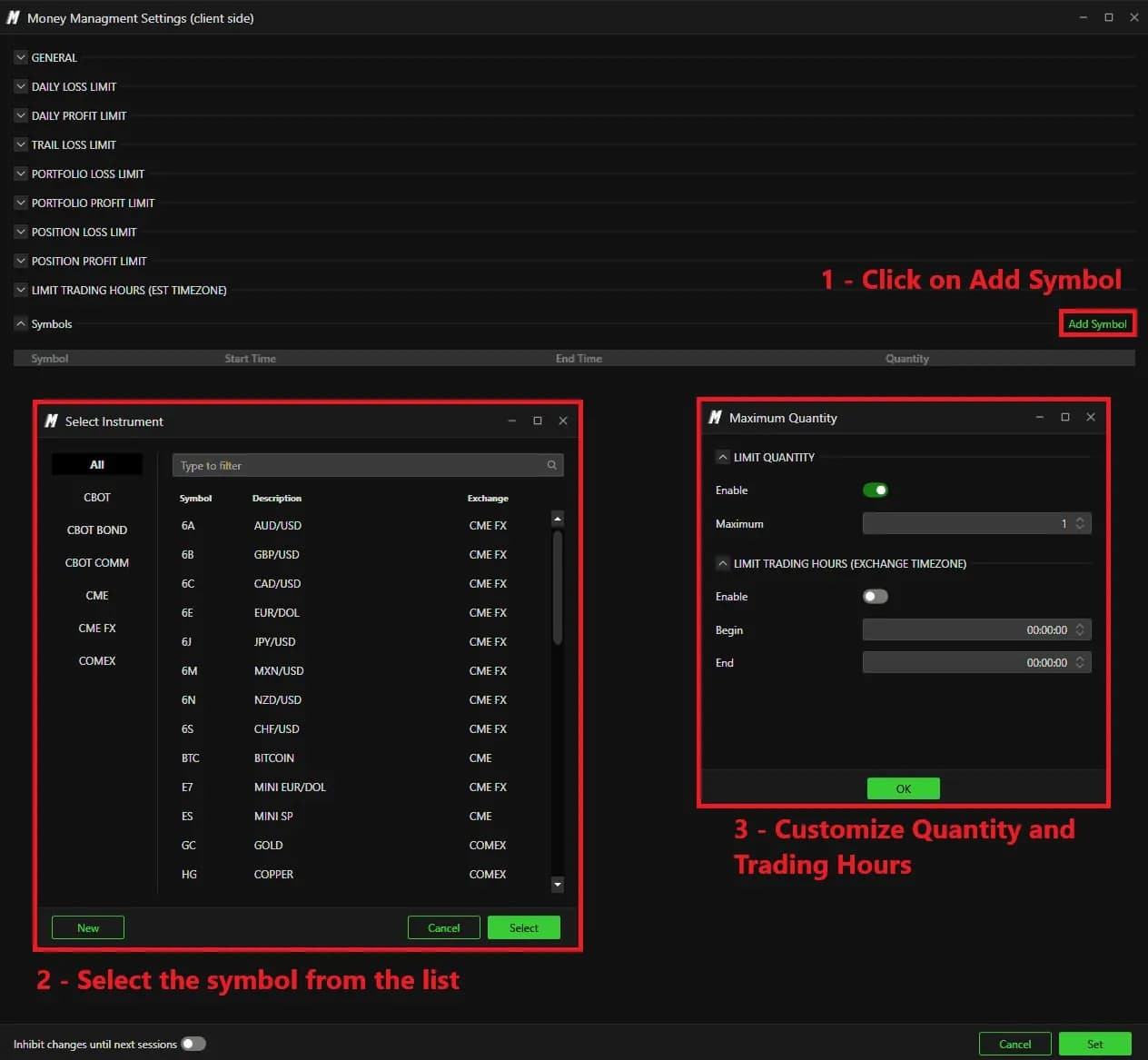
Add Symbol opens an instrument picker by exchange, then a Maximum Quantity window. LIMIT QUANTITY caps the number of contracts on that symbol, which is how you mirror the firm's contract limit. The same window has its own trading hours, in exchange time.
Daily limits and the trailing limit: the Action field decides
The daily sections set the size of a bad day, and the Action field sets what happens when it arrives. DAILY LOSS LIMIT and DAILY PROFIT LIMIT take a Value and a Unit, Money or Percentage. TRAIL LOSS LIMIT, the daily trailing drawdown, adds Action, Include open positions and Pause time (minutes).
| Setting | Default | What it changes |
|---|---|---|
| Enable (GENERAL) | Off | Nothing is enforced until it is on |
| Symbols - Exclude not listed | Off | On: only symbols in the Symbols list can be traded |
| Action | Daily pause | Daily pause locks for the session, Timed pause for Pause time, Flat closes without a lock |
| Value / Unit | 0 / Money | The threshold, in dollars or as a percentage |
| Include open positions | Off | On: open profit and loss count toward the limit |
| Pause time (minutes) | 0 | Length of the lock, used with Timed pause |
| Inhibit changes until next sessions | Off | On: rule changes wait for the next session |
Daily pause is the action that means stop. Timed pause is a cooling-off break. Flat closes the positions but leaves the account open, so you can be back in a minute later: keep it for cases where that is truly what you want.
Include open positions is the switch that matches how most firms count. With it on, an open gain that gives back more than the limit fires the action before the trade is closed. That is the closest the Risk Manager comes to an intraday trailing rule. For how firms compute their own version, see trailing drawdown, explained.
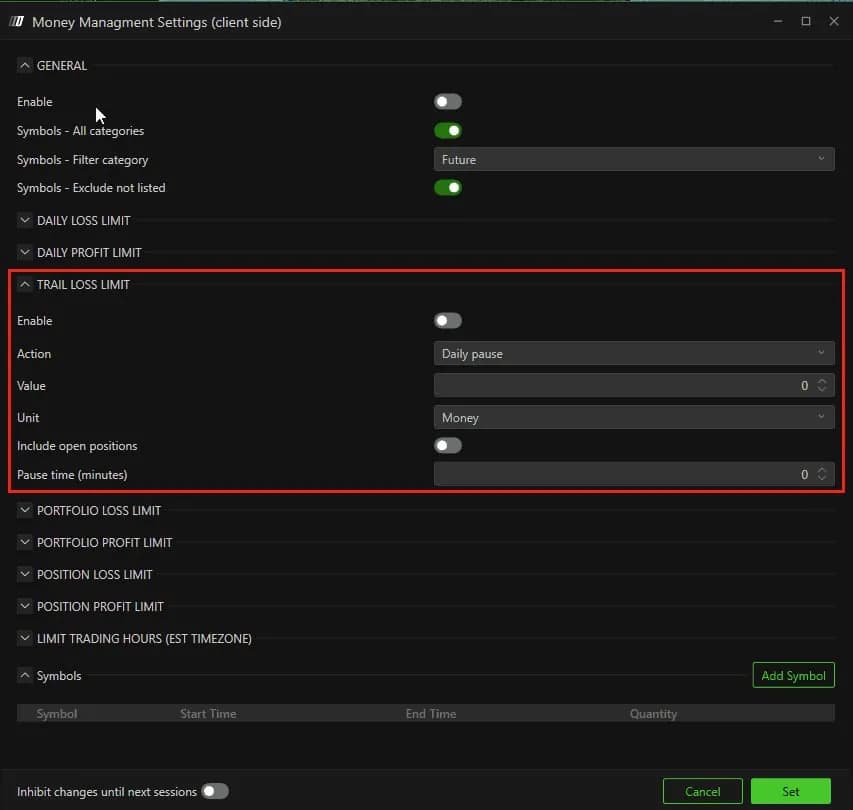
What to check first: in the screenshots of this version, the DAILY LOSS LIMIT section shows Enable, Value and Unit, without its own Action field. Trip it once on a SIM account to see exactly what it does before you rely on it with a funded account.
Portfolio and position limits
Two more layers catch what the daily limits let through. PORTFOLIO LOSS LIMIT and PORTFOLIO PROFIT LIMIT watch the sum of open positions: one ES and one NQ can each look fine while together they are past what you accept. POSITION LOSS LIMIT and POSITION PROFIT LIMIT watch one trade at a time and flatten it on a breach.
The position limit is a safety net under your stop, not a replacement for it. Set it a little beyond the stop you plan to use, so it only acts when an order did not do its job. Your planned risk per trade should come from the drawdown, as laid out in how many contracts to trade on a prop firm account.
Hours, then the freeze
LIMIT TRADING HOURS (EST TIMEZONE) bounds the session with a Begin and an End, always in New York time, whatever your computer's clock says. Traders in London or Paris should count the offset and recheck it around the clock changes. End the window a few minutes before the firm's flat time, and before the hour your Strategy Report shows you lose in.
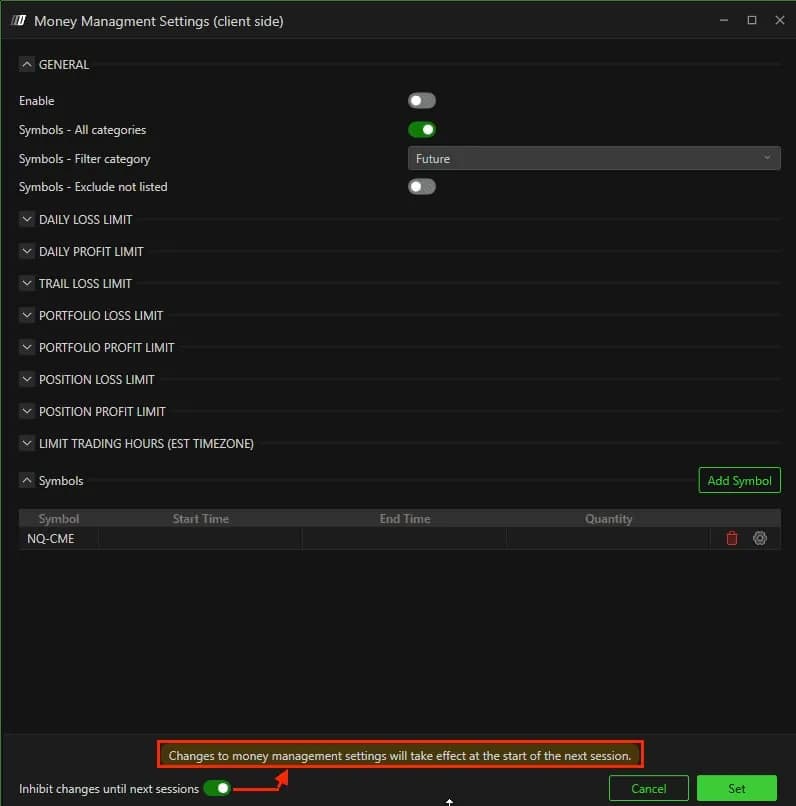
Then turn on Inhibit changes until next sessions at the bottom of the window. A message confirms that changes will only apply from the next session. From then on, no limit can be loosened at the moment it starts to bite, which is the moment it is worth the most. Nothing is saved until you click Set.
When the lock falls
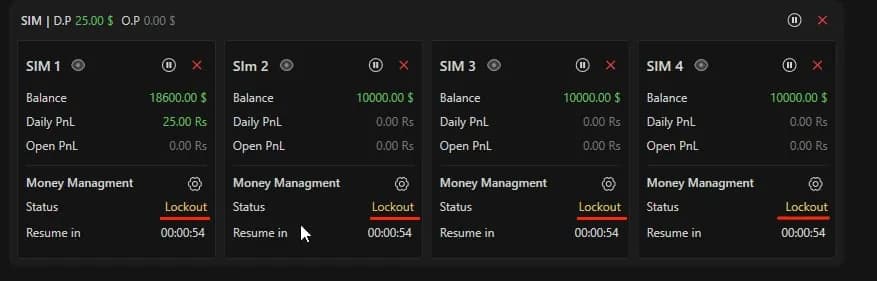
A breached rule switches the account's Status to Lockout, with a Resume in countdown. A timed pause lifts at the end of its countdown. A daily lock lifts by itself at the CME reset, 18:00 New York time. Before that, only DeepChartsOFF support can unlock the account from the backend, and it can take a while. Set your limits with that in mind: the rule is valuable precisely because you cannot undo it yourself.
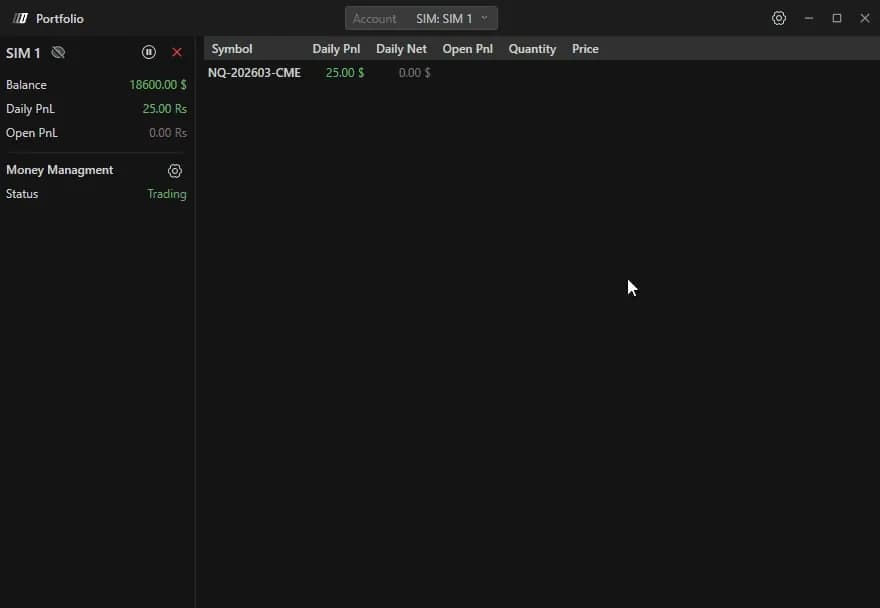
The eye on an account card opens the detailed view, one row per symbol with its daily and open result, so you can see what tripped the lock. Remember also that the Risk Manager runs client side: it protects the accounts you trade through DeepChartsOFF, while the platform is open. Keep it running until you are flat for the day.
Firms that run DeepCharts